As cross-platform development accelerates, companies are required to overcome the barriers caused by single-platform development. For apps on iOS, Android, and various other similar frameworks, platform optimization is also essential. However, using traditional methods require creating the same application twice, resulting in redundant effort, longer development times, and increased maintenance costs.
This blog will help business leaders and Android developers to consider migrating to KMP as part of their long-term success plan. Moreover, it will describe its functions and how it can accelerate the development of native performance applications. If you are working on an Android app and wish to port it to iOS with less labor, or want to scale your KMP projects into other platforms, this will prove to be beneficial.
KMP doesn’t substitute for the native ecosystem, unlike frameworks like React Native. In fact, it permits you to write platform-specific solutions if required while exchanging common code and business logic across platforms. With this new model, you may use a constructed multiplatform approach for UI coherence, employ native code for unique device features, and create apps that function flawlessly on iOS and Android.
We will go over the basics of Kotlin Multiplatform, how it’s used in actual projects, its advantages and disadvantages, and the reasons why more businesses are using KMP for cross-platform projects in the parts that follow.
What Is Kotlin Multiplatform?
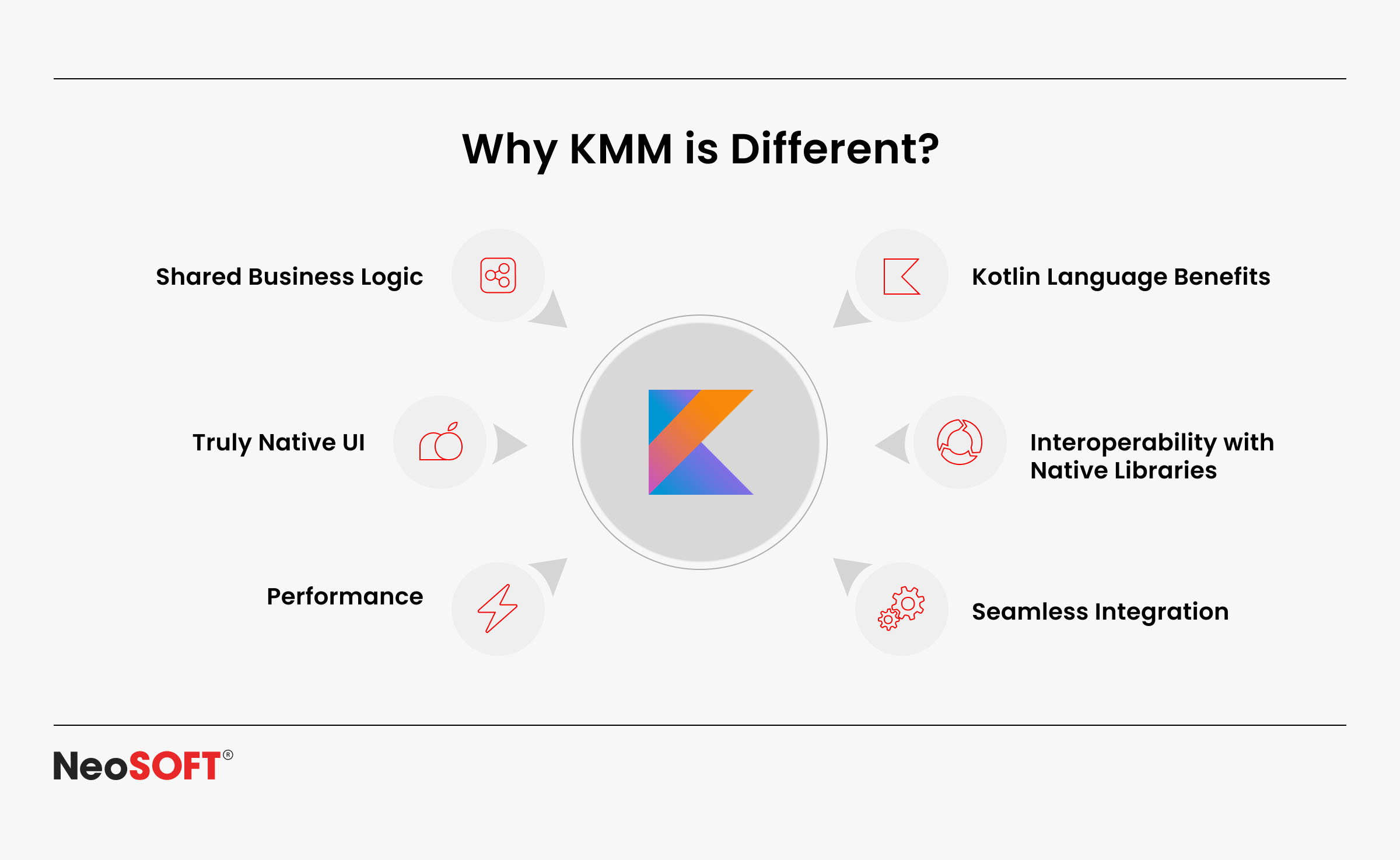
JetBrains’ open-source KMP framework, supported by Google, enables developers to construct identical code once and use it across desktop, iOS, and mobile apps for Android, among other platforms. Teams can exchange business logic using a shared module rather than keeping separate Android and iOS projects; however, they continue to produce platform-specific code when necessary.
This makes it easier for Android developers to produce iOS apps. Through Kotlin multiplatform migration, common components like the data layer or networking logic can be moved into a shared codebase, while UI and device features remain platform-specific implementations.
Key highlights of Kotlin Multiplatform projects:
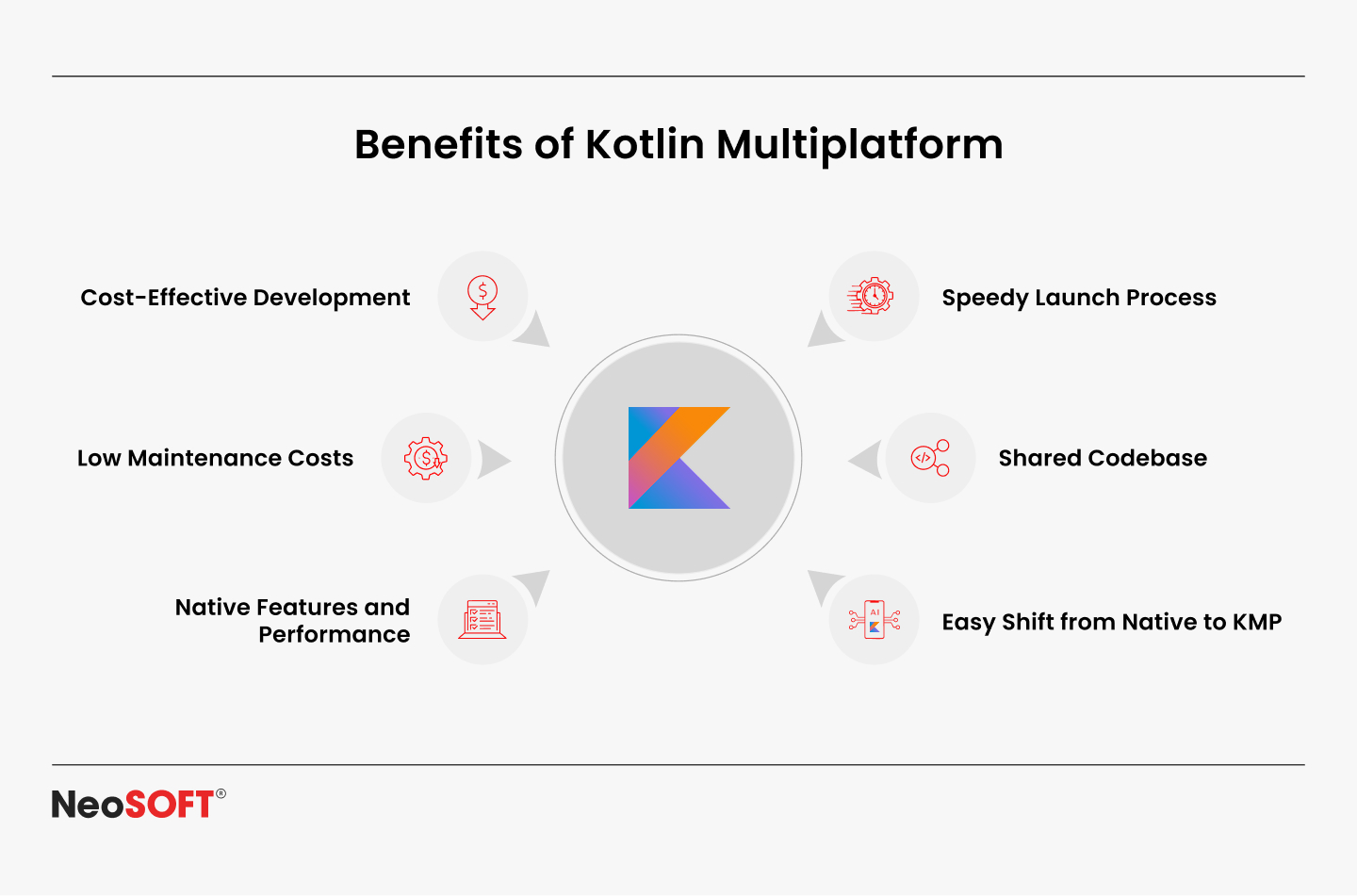
Shared codebase: Reuse Kotlin code for networking, authentication, and the same business logic across multiple platforms.
Platform flexibility: Access platform-specific APIs with native programming and integrate native code when required.
Seamless integration: Build Kotlin multiplatform projects in Android Studio, export native binaries for the iOS app, and integrate with existing workflows.
UI support: Use Jetpack Components or Compound Multiplatform to ensure a uniform design across several platforms.
KMP provides native performance, eliminates duplication, and helps companies construct programs that operate flawlessly on desktop, iOS, Android, and numerous other platforms.
How Kotlin Multiplatform Works in Real Projects
Two primary layers constitute a typical KMP project:
Shared module: Includes common code such as data layer, networking logic, and reusable business logic. Here, developers can avoid redundant work by transferring business logic across various platforms.
Platform-specific modules: Handle UI and platform-specific implementations for each target, such as Jetpack Compose for Android apps or Swift for an iOS app. These modules allow teams to access platform-specific APIs while preserving native performance.
In real-world cross-platform projects, this structure enables teams to:
Reuse the same business logic for features like authentication, data storage, or API calls across Android and iOS apps.
Build consistent interfaces with a composed multiplatform, while still customizing the design and functionality for different platforms.
Leverage dependency injection, utilize open source libraries, and apply native code to connect to device-specific features.
This adaptable approach lowers operational costs and speeds production, thereby rendering it simple for Android developers to transition to iOS applications. KMP projects allow teams to create applications that operate seamlessly on desktop, iOS, Android, and numerous other platforms with a well-organized common codebase and platform-specific code for unique needs.
Transitioning Your Android Codebase to the KMP
Integrating Kotlin Multiplatform (KMP) doesn’t require your current progress to be revamped. Beginning with the most crucial component, the migration can be implemented gradually.
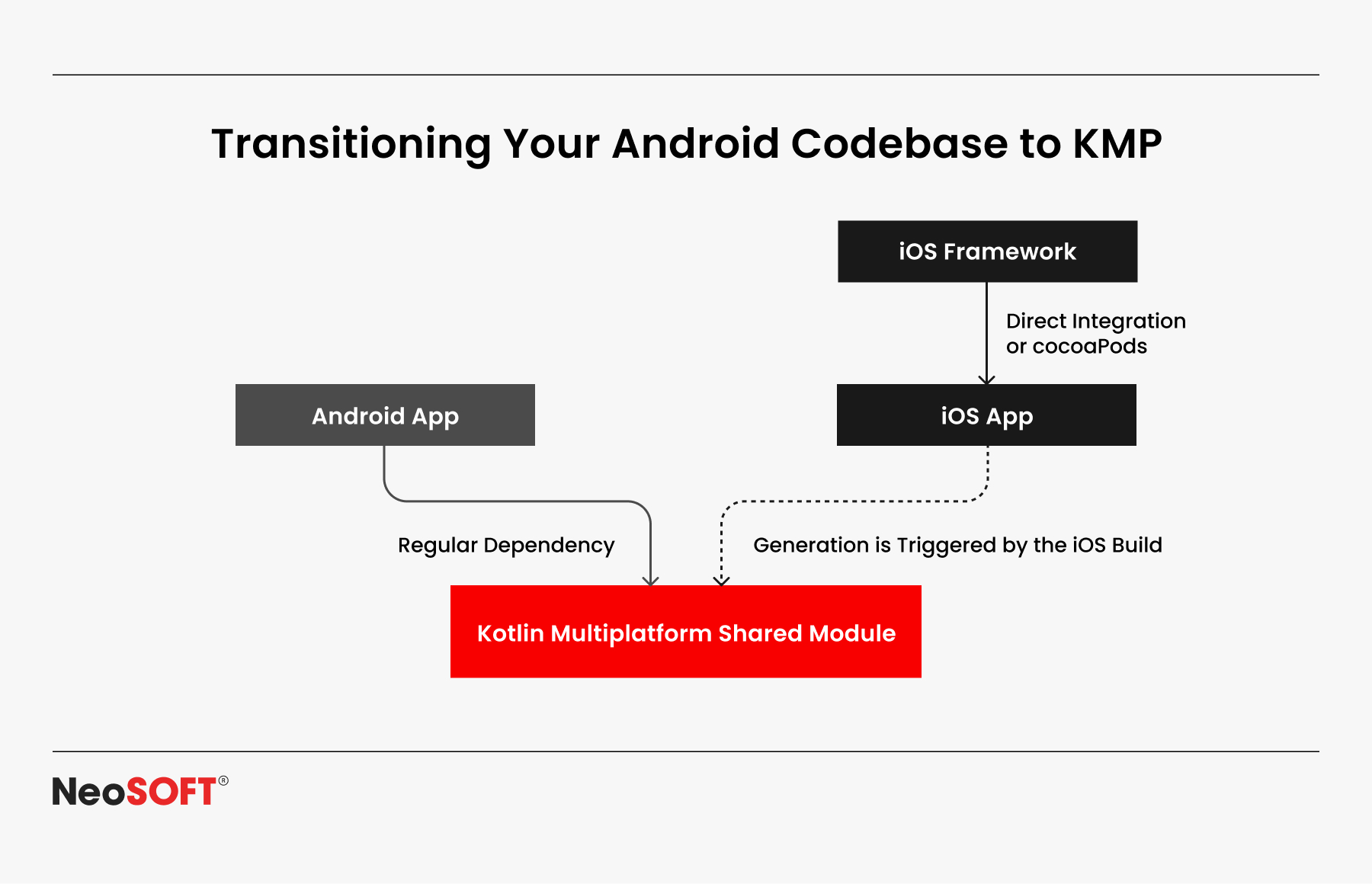
Making a multiplatform module in Android Studio is mostly an early step in the process. The following phase is to combine elements like networking, authentication, and the data layer into a single codebase, which guarantees consistency across projects and makes upgrades easier in the future.
Linking the shared base with iOS development using Swift or Objective-C constitutes the next step. In order to utilize the shared functionality without interfering with current workflows, native binaries can be created. Teams can increase their adoption at a reasonable pace by gradually adding new features to the common module.
This progressive approach promotes them to be creative around cross-platform development without affecting dependability. Since information transfer decreases long-term maintenance costs, cuts down on duplication, and shortens release cycles, it is both strategic and practical.
This method improves code consistency, flexibility, and coherence within Android and iOS development teams, simultaneously streamlining the technical translation and encouraging teamwork.
Key Advantages of Kotlin Multiplatform
Code Reuse and Efficiency
One of the biggest benefits of KMP is the ability to write the same business logic once and then employ it in both iOS and Android apps. Developers can combine essential elements such as networking, authorization, and the data layer into just one module rather than running several Android and iOS projects.
This approach reduces redundancy while boosting code reuse and consistency in multi-module applications. This reduces the amount of repetitive coding and error-proneness for an Android developer who wishes to produce iOS applications. By leveraging a single codebase, teams may ensure a smoother workflow across numerous platforms, expedite releases, and save on development.
Lower Maintenance Costs
With KMP projects, bug fixes and updates are applied once in the shared code and automatically reflected across both Android and iOS apps. This lowers expenses and streamlines long-term support by doing away with the requirement to keep repetitive patches in distinct Android and iOS components.
This directly translates into more predictable project deadlines and reduced maintenance costs for businesses overseeing large-scale cross-platform initiatives. Companies that use Kotlin Multiplatform frequently discover that engineering resources may be diverted from tedious maintenance to innovation.
Seamless Integration with Native
KMP makes it simple for developers to combine native and Kotlin code, unlike frameworks that rely on JavaScript bridges like React Native. This suggests that while directly contacting platform-specific APIs and creating platform-specific code as needed, developers can still benefit from a single base of shared business logic.
The outcome is native performance driven by native binaries and Android, as well as the capacity to produce programs that function flawlessly on several platforms. To design rich, responsive user interfaces without sacrificing flexibility, teams can also employ dependency injection, open source frameworks, and contemporary solutions like Jetpack Compose or Compose Multiplatform.
Broad Platform Support
Kotlin Multiplatform KMP extends beyond iOS and Android. It allows businesses to develop apps for several platforms inside a single ecosystem because it supports desktop, online, and other platforms. Therefore, KMP is an effective choice for businesses seeking extensive cross-platform development because of its adaptability.
Businesses can grow more effectively, adjust to changing requirements, and guarantee consistent performance across all contexts by organizing work into KMP modules. The framework continues to expand as more businesses embrace KMP and contribute tools and libraries, enabling businesses to produce feature-rich, reliable apps more quickly while preparing for the future of multiplatform development.
Kotlin Multiplatform vs React Native
Kotlin Multiplatform (KMP) and React Native are two popular choices when examining cross-platform frameworks, regardless of the fact that they employ varying approaches to problem-solving.
React Native: The runtime bridge that it utilizes helps it to connect JavaScript to native API’s. However, depending on a bridge might result in performance overhead, particularly in applications that handle a lot of data, use many animations, or have device-level interactions.
Kotlin Multiplatform: Instead of utilizing an intermediary layer, KMP builds down to native binaries. This lets developers maintain crucial business logic consistency across projects, improve interaction with current toolchains, and gain direct access to device APIs. When KMP is used, apps function effectively, are more reliable, and require less periodic upkeep.
While KMP is favorable owing to its native speed, device customization, and effective code reuse, React Native can be used for situations where rapid development is more essential than optimization.
Risk Factors and Implications
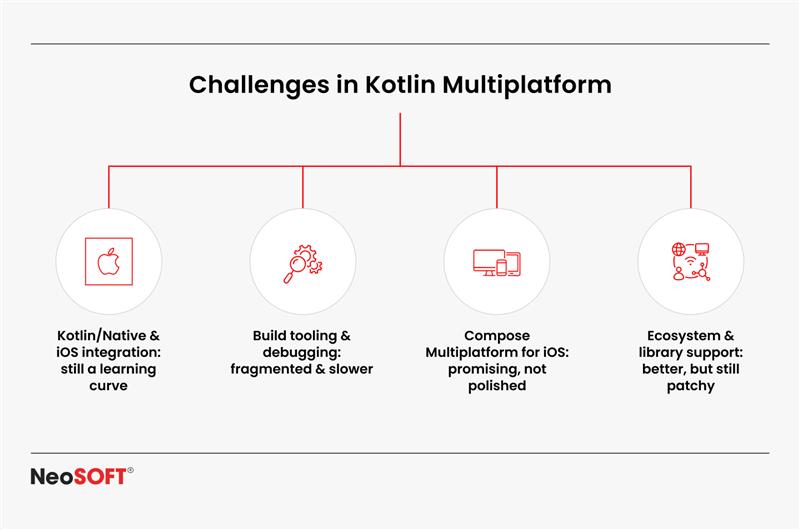
Learning curve: It may take some time for developers who are used to Android programming to acclimate to iOS apps and Objective-C compatibility. This is a frequent early adoption challenge, but with appropriate documentation and guidance, everything can potentially be made easier.
Tools and libraries: The ecosystem of open source libraries for KMP projects is growing, but it is not yet as mature as older frameworks. Teams often discover themselves combining community-driven technologies with customized solutions to deliver seamless adaptability as systems get more linked.
Platform-specific code: Push notifications, hardware sensors, and improved device storage are examples of features that require platform-specific implementations even with a resilient shared codebase. This implies that in order to ensure correct interaction with each operating system, developers must keep monitoring distinct Android and iOS apps for specific procedure components.
In spite of these factors, the adoption of KMP is growing fast. The developer coaching community is rapidly strengthening the ecosystem as more businesses invest in cross-platform projects and adopt open-source libraries.
The Future of Kotlin Multiplatform
Since one of the primary benefits of KMP is that it can be gradually used, it enables businesses to implement common modules without completely redesigning their systems. Through improving consistency in UI development across devices, frameworks such as Jetpack Compose and Compose Multiplatform are boosting adoption. Additionally, Android Studio’s enhanced tools and the constant expansion of open source libraries are facilitating teams’ experimentation, prototyping, and production scaling with less difficulty.
KMP initiatives are anticipated to offer definite commercial advantages as adoption increases, including quicker release cycles, reduced maintenance expenses, and increased team efficiency. As more businesses share success stories, trust in the framework’s long-term sustainability is growing.
Looking ahead, KMP’s future depends on striking a balance between flexibility and code reuse. KMP presents itself as a long-term answer for contemporary cross-platform development by allowing companies to reuse what is really important, such as networking, data processing, and security, while leaving room for customization.
Conclusion
More than just a framework, KMP is a calculated approach to contemporary app development. By allowing shared code reuse, reducing development time, and preserving native performance, it allows companies to create apps for desktop, iOS, Android, and other platforms without repeated labor.
Shorter release cycles, faster testing, and consistency are all advantages made possible for developers through integrating business logic into a single module. Additionally, by releasing teams from supporting disjointed codebases while focusing on developing new features, it enhances productivity and teamwork.
The advantages are obvious from a business standpoint: reduced maintenance costs, quicker time-to-market, and flexibility through progressive adoption. KMP can be implemented gradually by companies, integrating it where it is most beneficial and growing with confidence over time.
In the end, KMP facilitates more intelligent choices by striking a balance between scalability, performance, and cost effectiveness. To discover more on how it can assist you in developing scalable, high-performing applications specific to your sector, send us an email at info@neosofttech.com. The future of app development lies in adaptability. Connect with our experts today, to choose a smarter, more unified path to digital success with KMP.
Every organization wants its employees to stay connected on any device, irrespective of the place. The real issue that stands in their path is scaling that vision without causing disorder. Businesses have used strategies like BYOD (bring your own device) along with other mobile platforms to remain connected with their staff, clients, and collaborators. While this flexibility increases productivity, it also raises serious concerns about device upkeep, offering uniform user interfaces across platforms such as Windows, Linux, iOS, and Android, along with safeguarding company data.
IT professionals and developers working together are capable of building an adaptive digital platform that integrates productivity, security, and dependability. Device governance and security are administered by enterprise mobility management (EMM) systems, but companies also need a contemporary approach to app development that speeds up platform delivery, guarantees maintainability, and cuts down on development time.
The significance of Kotlin Multiplatform (KMP) lies in this situation. Through the customization of platform-specific features and graphical interfaces, KMP allows teams to share Kotlin code and business logic, facilitating the development of scalable, secure, and future-ready cross-platform enterprise apps.
This blog examines how Kotlin Multiplatform and enterprise mobility management solutions collaborate to help businesses address mobility issues head-on by producing apps that are simpler to create, maintain, and scale across sectors.
Understanding Enterprise Mobility and EMM
What Does Enterprise Mobility Implicate?
Enterprise mobility aims to provide an appropriate digital ecosystem to the employees where they can access apps, important business data, and other resources via mobile or any equivalent gadget, beyond promoting remote work. Furthermore, it indicates:
Deploying Android and iOS apps for employees in the field.
Supporting web solutions and extending access to desktop platforms such as Windows and Linux.
Allowing groups from numerous sectors to work together harmoniously and continue to produce at high levels.
Business processes are changed by this independence, but it also presents new difficulties. Thus, cross-border device management, data security, and setting configuration become essential for IT professionals.
Additionally, they have to manage preserving critical company data on devices while permitting personal apps on BYOD devices. The consequences of unauthorized mobility may involve fragmented systems, administrative burden, and safety hazards.
Businesses require excellent tools for management and established governance that monitors compliance, scalability, and security for this shift to be successful.
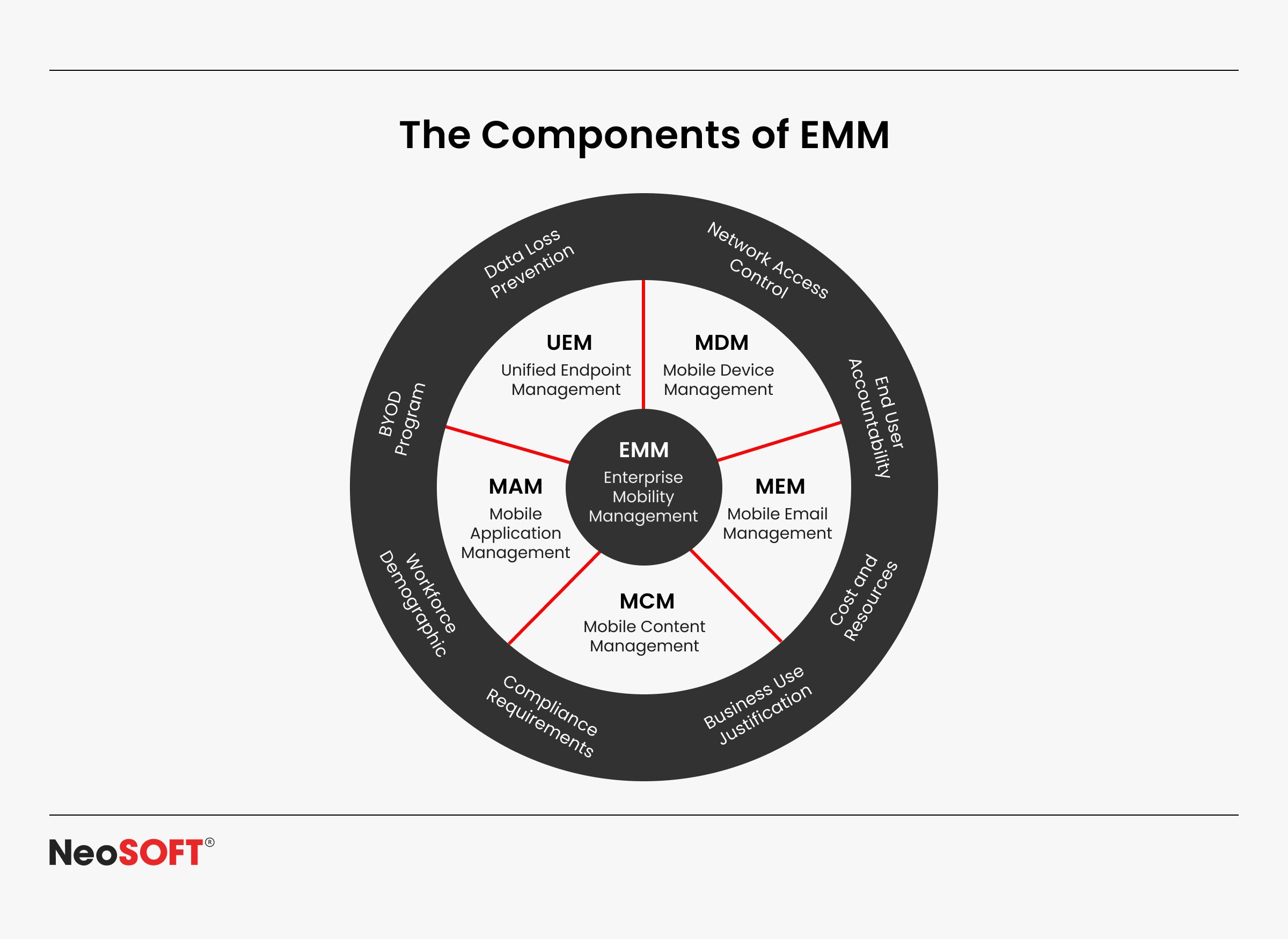
Enterprise Mobility Management (EMM) Components
An EMM solution gives businesses the centralized foundation they need to handle the increasing number of mobile platforms, apps, and devices. With the use of EMM, businesses can:
Whether they are company-owned or BYOD devices given by employees, manage devices at scale.
Provide Wi-Fi settings, apply security rules, and send necessary software and updates to devices to configure them.
Restricting or sandboxing personal apps to ensure efficient app distribution while enabling the release of business-critical iOS and Android applications.
Prevent breaches and unwanted manipulation by securing sensitive company data on mobile devices.
Easily integrate with iOS apps, Android Enterprise, Windows, Linux, and other platforms to enable cross-platform interoperability.
The Enterprise Mobility Manager gives employees the flexibility to work effectively from any place while giving IT managers the knowledge and authority they require to protect the business.
Importance of EMM Solutions
Control: To guarantee safe and legal compliance, apply the same policies to every device.
Management: Utilizing unified dashboards, maintaining a tab on settings, devices, and apps in real time.
Security: Digital encryption, remote erase capabilities, and restricted access can all be used to protect sensitive enterprise data.
Productivity tools: Provide employees access to proper apps and services while lowering the risk.
A strong EMM allows clients to grow with confidence, knowing that their data, apps, and devices are secure. Due to these fundamental features, EMM is the cornerstone of modern mobility systems. However, developing the apps themselves remains challenging despite having strong control.
Apart from being easy to design, applications need to be scalable across multiple platforms. Considering this specific situation, KMP proves to be exceptional.
What is Kotlin Multiplatform (KMP)?
The novel KMP framework from JetBrains optimizes cross-platform development’s effectiveness, speed, and intelligence. For companies that need to develop secure, scalable, and reliable apps for an array of mobile platforms and devices, this approach works particularly well.
Separating the user interface (UI) from business logic is where KMP’s true power resides. Developers may customize it to satisfy the requirements of each platform after adding common features such as networking, data storage, authentication, or API connection. This allows it to offer a native user experience that clients anticipate on systems like iOS, Android, and others.
How it Works
Shared Kotlin code is generated by developers for common functions like handling information, communication, and authentication.
Application developers of iOS, Android, and desktop can readily convert this code to platform-specific APIs.
Since the apps are developed rapidly with greater consistency across platforms, the development process gets more efficient.
Platform-specific features and shared logic provide organizations with the best of both worlds: rapid growth without sacrificing performance or user experience.
Benefits of Kotlin Multiplatform
Scalability: Uses the same code on many platforms and devices to ensure enterprise apps develop naturally as business requirements change.
Maintainability: Over time, an integrated codebase adjusts, enhances, and preserves stability.
Efficiency: Companies may be able to launch their products sooner since they take fewer resources and time to develop.
Flexibility: A fully native app experience may be achieved by repeatedly employing business logic to alter the functionality and user interface for all of the platforms.
Integration: Existing investments in technology need not be dismissed or established from scratch because KMP readily integrates with existing tools, APIs, and services.
Why it Matters for Enterprises
When businesses use contemporary mobility solutions, KMP makes sure that apps are efficient, consistent, and future-ready across platforms. KMP eliminates the need for IT leaders to choose between speed and quality. Apps that are safe, scalable, and easy to maintain across Android, iOS, and other platforms benefit businesses, and developers benefit from code reuse and faster cycles.
In a world where businesses must accommodate both company-owned and BYOD devices across various industries, Kotlin Multiplatform offers a useful, progressive solution. Businesses can innovate without being constrained by long development cycles or disjointed codebases thanks to it.
How Kotlin Multiplatform Addresses Enterprise Mobility Challenges
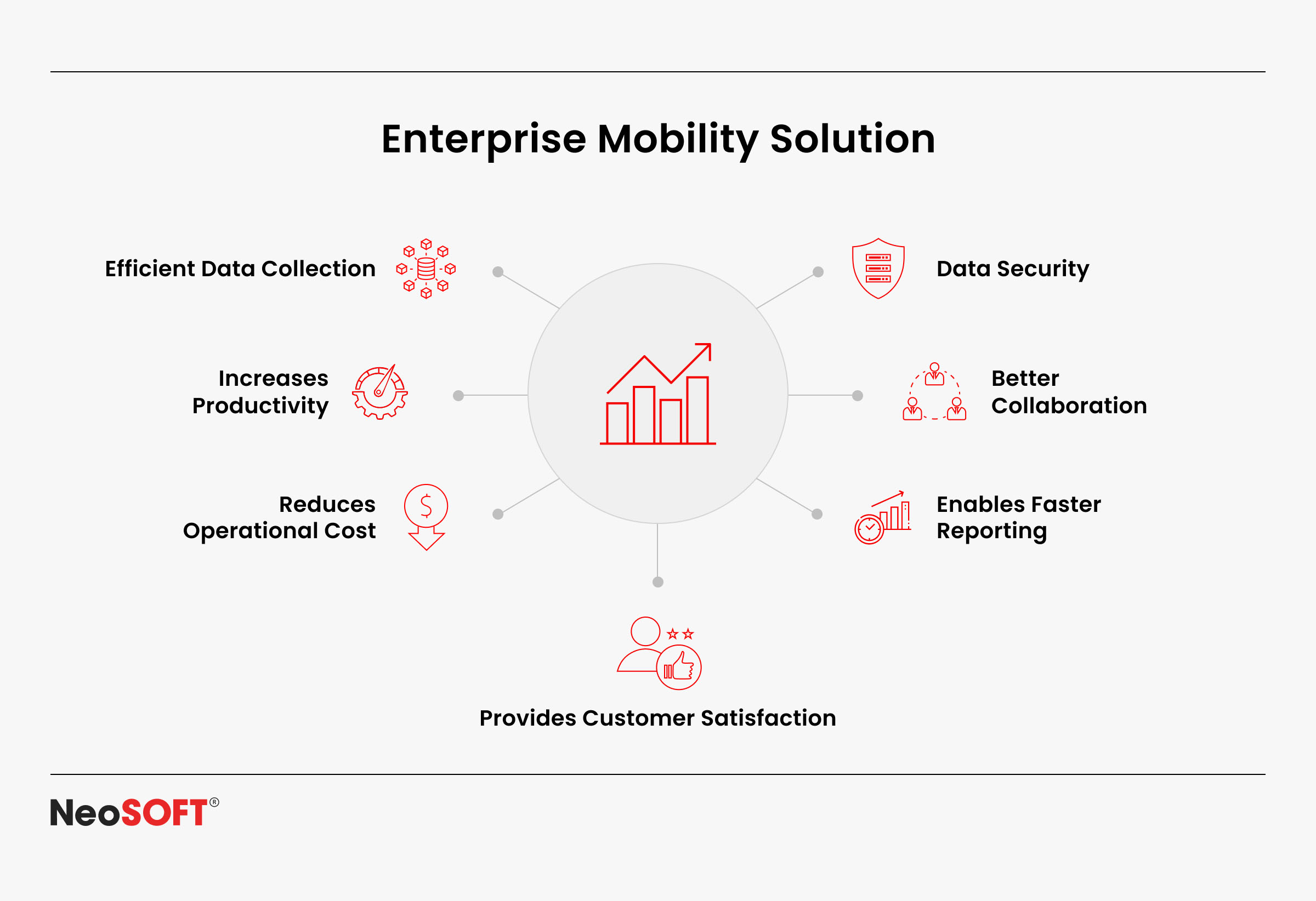
Enterprise mobility introduces complexity, multiple platforms, devices, and users demand seamless experiences. Here’s how KMP helps:
Adaptability: Create apps only once and release them on many platforms, notably iOS and Android, to make sure they grow with user demand.
Sustainability: Updates can be applied across platforms without necessitating code modification thanks to centralized business logic.
Productivity: Code sharing among apps reduces the time taken for development.
Security: Faster communication with EMM programs to control access and safeguard company data.
Cost-effectiveness: Avoiding duplication of development on many platforms will minimize overhead.
Time-to-market: Applications can be deployed rapidly without compromising on their quality at a relatively low cost.
Use Cases
Company-owned devices and BYOD: Develop secure business applications for both iOS and Android while protecting company information.
Cross-platform mobility solutions: Building and distribution of a single web, iOS, and Android application.
Critical industries: KMP facilitates effective mobility in the retail, healthcare, finance, and supply chain sectors.
Example / Case Study
Consider a logistics company managing a mix of company-owned devices and employee smartphones. By using Kotlin Multiplatform, the company can do the following:
For order tracking, Android and iOS apps may collaborate on basic business logic, providing uniform functionality, faster rollouts, and reduced duplication.
Assure security and policy adherence by allowing IT teams to set up devices via EMM with the appropriate Wi-Fi settings and compliance standards.
Sharing Kotlin code enables you to publish updates with greater speed, thereby decreasing development time and enhancing app dependability.
Best Practices
Keep business logic in shared Kotlin code while creating platform-specific UIs. This guarantees that programs will work continuously and deliver native-level user experiences that are specific to each platform.
Use EMM programs and APIs to expedite device management. A unified system helps businesses simplify setting up, manage compliance, and improve security.
Provide developers with specialized KMP learning materials to hasten uptake. Well-prepared teams are more effective, adjust rapidly, and accelerate the learning curve.
Applications must be tested across platforms for optimal speed, security, and usability. This guarantees that end users, regardless of the device or operating system, benefit from a seamless experience.
Comparing KMP With Other Alternatives
Native Programming: An ideal choice for feature-specific apps owing to its speed and API integration, but it consumes a greater amount of effort and is relatively expensive.
Flutter: Speeds up development while maintaining visual integrity by providing a consistent architecture for user interfaces across all platforms. Strong integration abilities are important for workplace mobility; however, they are insufficient, especially when it comes to controlling device security and limitations.
React Native: Its extensive community and flexibility of use promote rapid MVP development and prototyping. Upgrading to enterprise-grade systems may present two challenges: performance limitations and constrained native API accessibility.
Future Trends of Enterprise Mobility with KMP
Cross-Platform Growth: With native UI, EMM platforms permit developers to operate together on the same business logic while saving time-to-market and development costs. Via cross-platform diversification, enterprises may offer consistent app performance and user accessibility across a range of devices.
Smarter EMM Integration: The degree of complexity of enterprise mobility management (EMM) options has grown along with the advancement of device administration, provisioning, and security. Secure data management, streamlined installation, and continuous monitoring across corporate devices will be guaranteed by closer integration between Kotlin Multiplatform-based apps and forthcoming EMM platforms. This partnership will support IT administrators to oversee large-scale mobile deployments.
Cloud-First Mobility Solutions:Cloud-first mobility solutions are growing more and more popular amongst businesses because of their central administration, installation, and application delivery capabilities. Businesses can grow apps more quickly, coordinate platform upgrades, and ease backend interaction using KMP. By addressing the requirements of a workforce that emphasizes mobile devices, this cloud-centric approach ensures agility and lowers infrastructure expenses.
Developer Ecosystem Expansion: The developer community for Kotlin Multiplatform is predicted to expand significantly. The spread of KMP training materials, tools, and APIs will accelerate enterprise adoption and lower adoption barriers. The open-source ecosystem will also be strengthened by this growth, supporting developers to develop reliable and future-proof enterprise mobility solutions.
AI + Mobility Synergy: Artificial intelligence is anticipated to eventually be used more frequently in business mobility. Companies may obtain data-driven insights using AI + mobility to assist IT administrators in better monitoring devices and patterns of consumption. In dynamic work environments, machine learning models can maximize performance, customize employee experiences, and maintain compliance, while predictive analytics may enhance security by detecting anomalies.
Conclusion
When Kotlin Multiplatform and corporate mobility management are combined, businesses can create scalable, maintainable, and effective apps for various platforms. This method gives developers and IT administrators the ability to create apps that function flawlessly on both company-owned and BYOD devices, save down on development, and secure corporate data.
The trajectory of cross-platform development as enterprise mobility evolves will be decided in large part by Kotlin Multiplatform, which in turn would help businesses secure mobile devices, boost productivity, and speed up app deployment across Android, iOS, the web, and other platforms.
Are you curious about how Kotlin Multiplatform can improve your workplace mobility solution? Contact our experts at info@neosofttech.com to find out more about scalable ways for creating, sustaining, and safeguarding apps that support your digital transformation.
The foundation developers choose to build on shapes every swipe and scroll before it even reaches the user.
Mobile applications have evolved from being simple utilities into strategic investments that drive user engagement, boost business performance, and strengthen brand loyalty. Spanning Android, iOS, and other platforms, they are now inclined towards shaping functionality, long-term sustainability, and accessibility for modern businesses.
The framework choice directly impacts how project teams operate. Using the same code across several platforms, native API access, backend system interface, and development tool support all have an impact on how rapidly teams can build, debug, and maintain programs. Furthermore, it ensures that projects are completed more quickly, are optimal for users, and are easier to extend or upgrade in the future.
This blog will look at two popular mobile development solutions: React Native and Kotlin Multiplatform. It is intended for development teams, product managers, IT decision-makers, and skilled Android developers who wish to leverage developer tools, comprehend trade-offs, and make wise choices while creating excellent native apps and cross-platform solutions. It will aid developers and stakeholders in choosing the right framework that fits their long-term strategy, client requests, and project specifications.
Understanding the Frameworks
React Native
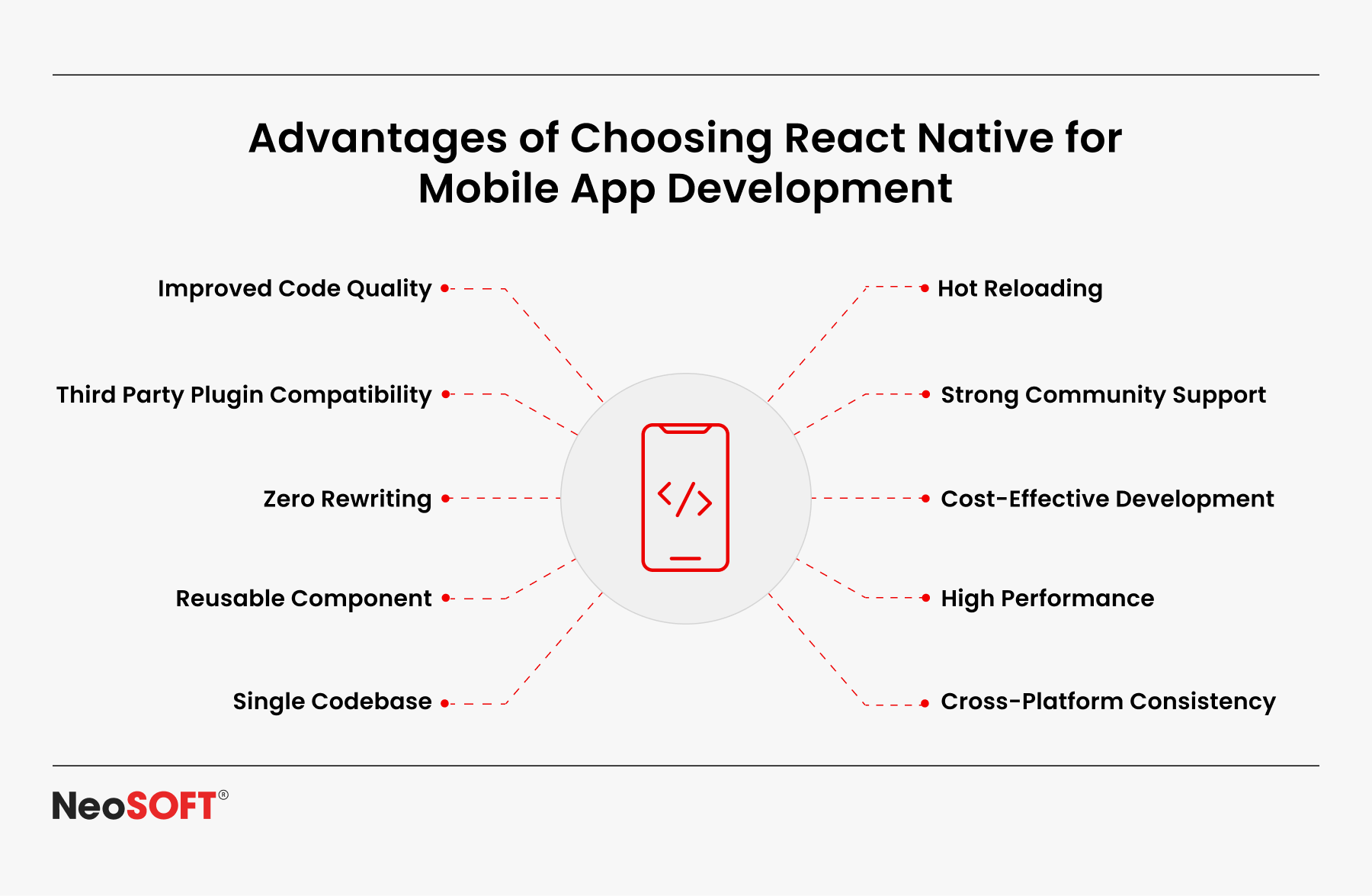
React Native, developed by Meta, is a declarative UI framework that enables developers to write applications in JavaScript and React for both Android and iOS. Also, it enables rapid prototyping and excellent cross-platform mobile app development using its vast library ecosystem and pre-built components.
Key advantages include:
A single codebase can provide cross-platform compatibility, which reduces platform development complexity and time.
A large community with active contributions, extensive documentation, and reusable libraries supported by global developers.
Simple connection with web applications, iOS, and Android developer tools, native code, and backend APIs.
Businesses that want to rapidly build apps that run on different platforms without maintaining numerous repositories are adopting React Native significantly.
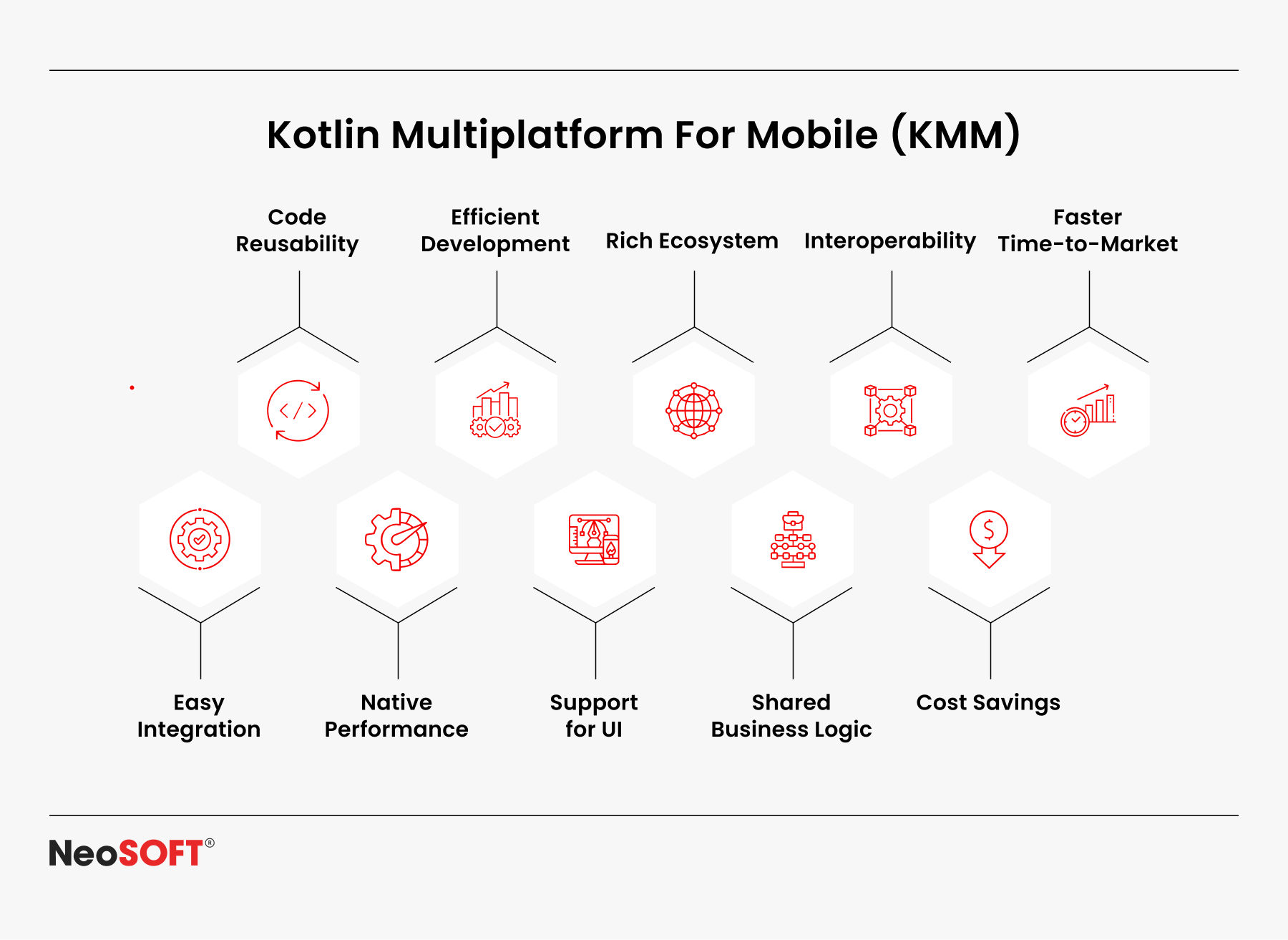
Kotlin Multiplatform For Mobile (KMM)
Developers can collaborate on sharing fundamental business logic between iOS and Android while creating native code for platform-specific features whenever required, with the help of KMM. The development of scalable and high-performing apps is made possible or encouraged by this blend of native and shared development.
Primary advantages include:
High-performance native apps are made possible by direct access to native APIs on iOS and Android.
Strong Kotlin language features that increase efficiency and decrease errors include type inference, coroutines, and null safety.
Robust assistance from JetBrains and Google, with expanding community involvement and changing documentation.
A flexible approach to managing Windows, Linux, and macOS platform-neutral projects. With 22% of Kotlin developers presently using Compose Multiplatform, JetBrains’ State of Developer Ecosystem 2023 report shows that Kotlin’s UI-sharing features are expanding across desktop, web, Android, and iOS.
Enabling enterprises and professional Android developers. KMM is particularly well-suited for enterprise-grade apps, long-term scalability, and the ability to reuse shared business logic across platforms while preserving the benefits of native programming.
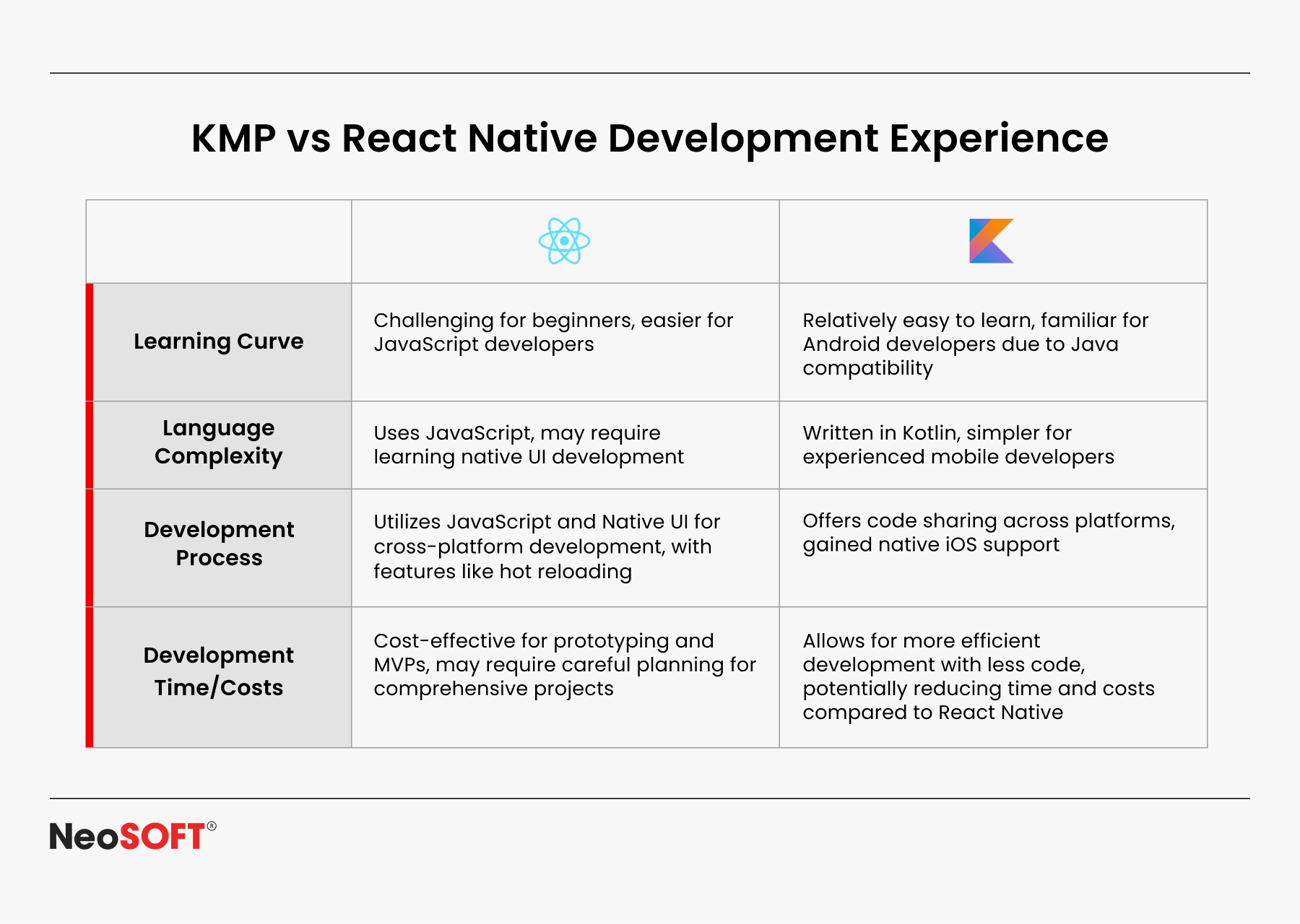
Learning Curve & Developer Expertise
A company’s grasp of language and technology largely determines the learning curve.
React Native: Utilizing the same code for iOS and Android, developers who are already familiar with JavaScript and React may create apps with ease.
Teams that have prior experience with the internet no longer have to start from zero when creating mobile apps. The simple user interface architecture, user-friendly elements, and active community speed up project implementation and lower initial barriers.
Kotlin Multiplatform: For Android developers, Kotlin is a natural fit; its integrated features, such null safety and coroutines, make code faster and more reliable.
Extending the scope beyond Android to iOS, desktop, Linux, or servers creates a new challenge. Native code, SDKs, and APIs must be successfully integrated. Although it may take longer to set up, the advantages – software that is more stable at the core, simpler to maintain, and far less prone to errors over time – make the effort worthwhile
Key Comparison Factors
1) Development Speed & Productivity
React Native: Making use of the same code for iOS and Android substantially shortens deployment times for teams that are familiar with React and JavaScript. Quick refresh, pre-built components, and an established declarative UI basis all help to enhance workflow and speed up debug cycles.
Kotlin Multiplatform: The initial setup is slower since Kotlin code must be connected to native code, SDKs, and platform APIs. However, sharing core logic across different platforms reduces duplication. Advanced Kotlin language features (coroutines, null safety) provide reliability and fewer bugs in native programming.
2) Performance
React Native: Provides performance that is almost native for the majority of mobile applications. Tasks involving a lot of graphics or computation could need special native code modules for optimization.
Kotlin Multiplatform: Compiles to true native apps via JVM/LLVM. Direct access to platform APIs ensures smoother animations, faster load times, and optimized screen responsiveness across operating systems.
React Native: Owing to a large ecosystem of reusable parts and UI libraries, it is flexible for cross-platform design. Also, certain platform-specific peculiarities can necessitate the use of extra native code.
Kotlin Multiplatform: SwiftUI/UIKit and Jetpack Compose, respectively, offer apps on iOS and Android entire native control over the user interface. This gives developers the ability to design platform-neutral experiences.
4) Integration with Existing Systems & Tooling
React Native: It makes use of popular editors like VS Code and IntelliJ, the JS toolchain (Node, NPM/Yarn), and OTA update options. It connects to REST/GraphQL backend APIs with ease. Native bridges connect to SDKs when deeper integration is needed.
Kotlin Multiplatform: Interacts with Android Studio and Gradle for Android development and CocoaPods/Xcode for iOS app development with ease. Since Java and modern programming tools are very compatible, projects can expand across desktop (Windows, Linux, macOS), server, and other operating platforms.
5) Community & Ecosystem
React Native: Backed by a large, global community, with extensive documentation, frequent contributions, and many open-source library versions used by leading companies.
Kotlin Multiplatform: A younger but rapidly growing multiplatform ecosystem. Strong backing from Google and JetBrains, along with active developers improving documentation and tools.
6) Future Scalability & Maintenance
React Native: Permits quick cross-platform delivery; nevertheless, a significant dependence on other repositories and libraries may result in long-term maintenance issues for various versions.
Kotlin Multiplatform: Centralized shared Kotlin code minimizes recurrence. Its close alignment with native stacks simplifies updates and long-term support across different operating systems.
7) Security & Compliance Considerations
React Native: Framework dependencies need to be audited as they depend on numerous libraries and external components. Additional native code might be required for regulated APIs, encryption, and safe storage of sensitive data.
Kotlin Multiplatform: Grants direct access to security features at the platform level. Also, it works well for creating enterprise-grade, compliant apps where security is a top priority when paired with native toolchains and Kotlin language features.
8) Cost Implications
React Native: Economical for quick multi-platform rollouts and MVPs. Teams with JavaScript/React developers can quickly contribute without major retraining.
Kotlin Multiplatform: Entails a substantial investment cost, but it lowers ongoing costs by reducing errors, streamlining processes, and permitting code reuse across desktop, web, and mobile applications.
Use Case Scenarios
The project type, target platforms, and overarching business objectives all influence the most effective framework. Each alternative offers advantages that correspond to certain developmental requirements.
React Native is best for:
Start-ups and SMEs: Create MVPs and prototypes for web, iOS, and Android apps rapidly using the same code. The time to market ratio is lowered, and start-up costs are lower.
Companies focused on speed: Appropriate for tasks that need rapid development cycles, regular updates, and accurate debugging processes.
Teams with web expertise: Teams already familiar with JavaScript, React, and reusable components can transition smoothly into mobile app creation across multiple platforms.
Kotlin Multiplatform is best for:
Enterprises and large-scale apps: Curated for building native applications when security, reliability, and compliance with industry standards are crucial factors.
Feature-rich applications: The most effective apps are those that actively rely on native iOS frameworks and Jetpack Compose for Android, feature complex workflows, or have sophisticated user interfaces.
Long-term, multi-platform strategies: Easy to maintain and simple. Additionally, it supports an array of operating systems, such as servers, Linux, Windows, macOS on PCs, iOS, and Android.
Prospects for the Future and Industry Adoption
React Native: React Native is steadily improving performance through increased native code integration, new APIs, and enhanced developer tools, with the help of Meta and a large open-source community. Owing to their ability to create the same code for iOS, Android, and web apps, it has become a superior choice for companies that wish to use a single repository to access many platforms.
Kotlin Multiplatform: Thanks to assistance from Google and JetBrains, it is becoming more and more well-liked in professional and enterprise Android development. The Jetpack Compose framework is an excellent choice for those developing complex, long-term solutions for various operating systems, given its multi-platform features, increased Java interaction, and support for desktop (Windows, Linux, macOS) and server-based applications.
While React Native will continue to be the preferred option for cross-platform apps and short projects, Kotlin Multiplatform is expected to establish itself as the standard for economically viable and critical solutions that need native programming and strong collaboration with the current technology stack in the future.
Problem-Solving Framework
The manner in which the framework satisfies technical specifications and business goals will determine whether Kotlin Multiplatform or React Native is selected. Important elements consist of: Timelines & speed: React Native accelerates app development with the same code for Android, iOS, and even web applications. Kotlin requires more setup but delivers stable native apps for long-term projects. Budget & resources: Teams with JavaScript and React developers can cut costs using React Native. Kotlin may need a higher upfront investment, but it reduces bugs and improves maintainability across different platforms. Performance & UX: The majority of consumer apps work well with React Native, although it could lag on important screens or jobs requiring a lot of graphics. Kotlin guarantees improved efficiency and a nicer user interface with native code and Jetpack Compose. Scalability & maintenance: React Native depends on regularly updated versions and third-party libraries. Supported by Google and JetBrains, Kotlin provides longer-term support and better Java interoperability.
Assessing these aspects aids businesses in developing apps that are optimized, guaranteeing cross-platform compatibility, and selecting the framework that best suits their approach.
Conclusion
In the highly competitive mobile app development scenario, choosing a framework is a crucial company choice. Since React Native facilitates multi-platform compatibility, rapid development, and the support of a strong JavaScript/React developer community, it can be utilized by small services and businesses having shorter launch times.
The KMM framework is a top pick for companies wishing to develop safe, effective, and sustainable apps for the desktop, iOS, and Android platforms because of its comprehensive Kotlin functionalities and native equivalent speed.
Your ability to develop optimized apps, satisfy customer expectations, and offer regular assistance across several platforms could all be impacted by your decision between these two approaches.
Using the framework that best suits your business’s requirements, our team of skilled mobile developers and experts can assist you in developing scalable solutions. Contact us at info@neosofttech.com to explore how we can help with your forthcoming project. Partner with us today, to build secure, high-performing apps tailored for iOS, Android, and other platforms.
In contemporary app development, companies frequently have to choose between native performance and speed. Selecting the incorrect framework puts the mobile app development process at risk for setbacks, exorbitant expenses, or unsatisfactory user experiences.
This is why Flutter and Kotlin Multiplatform have become two of the most widely discussed frameworks today. Both provide robust cross-platform development tools that let programmers collaborate on business logic while making desktop, online, and embedded applications, as well as apps for iOS and Android.
For businesses today, multi-platform support is not optional—it’s a necessity. The correct framework has a direct impact on your development process, code reuse strategy, long-term maintenance efforts, and return on investment, regardless of whether you’re an enterprise concentrating on native development or a start-up seeking rapid development capabilities.
This blog offers valuable insights for product managers, IT decision-makers, Android and iOS developers, as well as business executives. To help you align your tech stack with your business goals, this comparison of Flutter and KMP explores key factors such as platform-dependent APIs, community support, development speed, future scalability, and native UI components.
The strategy that will have the greatest impact ultimately depends on your needs, whether you choose Kotlin Multiplatform Mobile for leveraging native UI elements and platform-specific code, or Flutter for rapidly launching apps with highly customizable widgets.
What is Flutter?
It is one of the most frequently employed cross-platform programming tools due to its near-native speed and faster development capabilities. By using Flutter, developers can employ a single code to make embedded systems along with desktop, web, iOS, and Android apps.
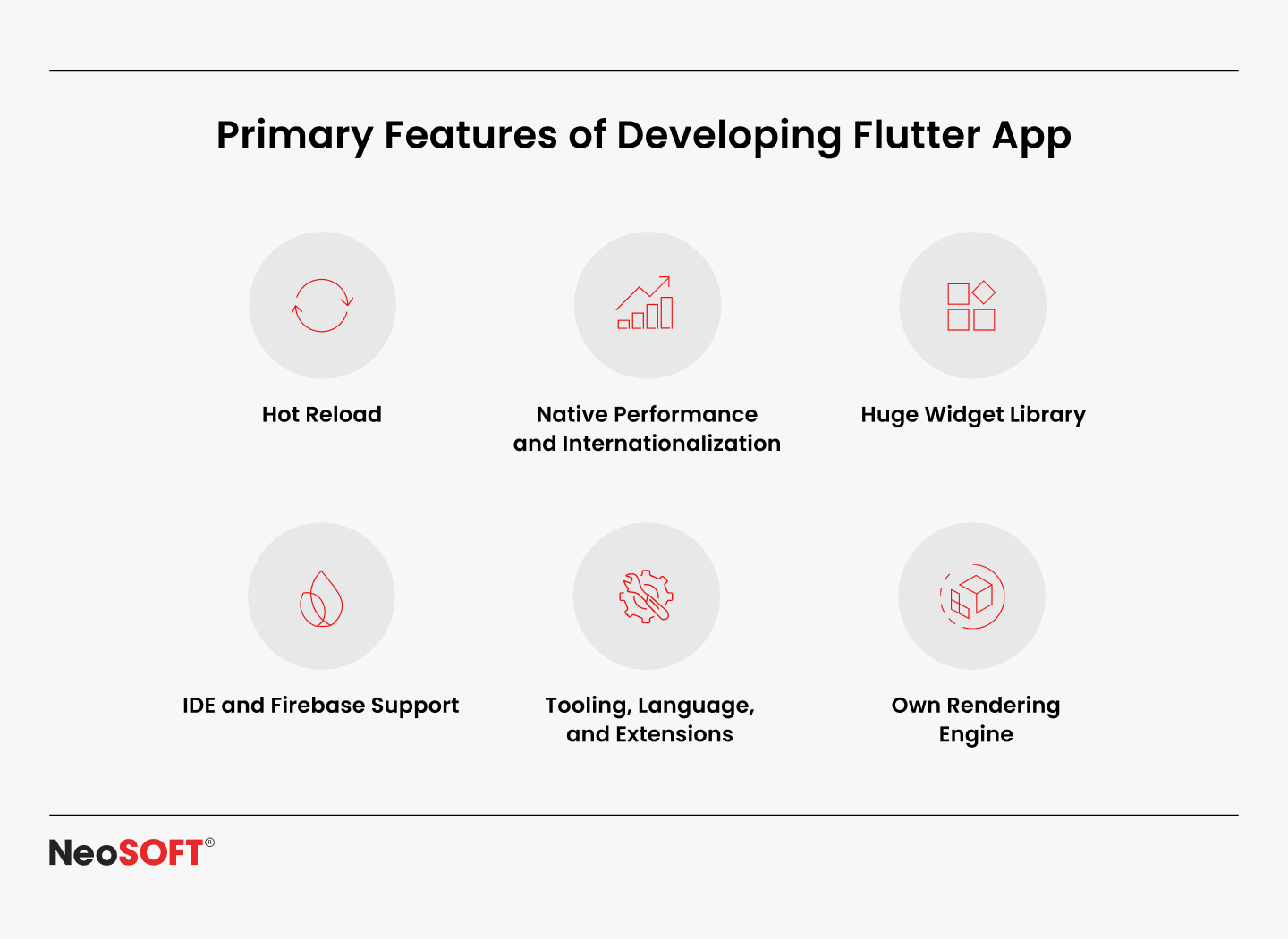
Core Features of Flutter
Hot reload feature: Allows you to modify the code, enhancing productivity and accelerating development.
Dart programming language: They operate identically to locally built apps due to them being directly translated into native machine code using the Dart programming language.
Own rendering engine: Ensures platform-wide client satisfaction while meeting demanding performance standards.
Customizable widgets: These provide both native and pre-made UI components that result in responsive and visually appealing interfaces.
Why Businesses Choose Flutter
Best suited for applications with faster turnaround times, Flutter aids developers in updating, testing, and iterating considerably more quickly. This is especially beneficial in competitive industries, where lowering overall development costs is important.
For companies looking to construct scalable and durable apps, its robust ecosystem, quick development time, and affordable price make it an excellent option. Also, the incorporation of platform-exclusive features like payments and geolocation is encouraged by the platform’s vibrant community and extensive external resource library.
By integrating its own rendering engine and performance, Flutter enables companies to keep their user interfaces consistent across iOS, Android, and desktop platforms. Offering efficient user experiences, it aids sectors like finance and E-commerce in client retention.
What is Kotlin Multiplatform?
A contemporary open-source technology that is widely used by iOS and Android, Kotlin Multiplatform distinctively approaches cross-platform programming. This framework focuses on code sharing for data models, important business logic, and API rather than replacing the complete UI layer. This enables developers to write platform-specific code for UI and device-level tasks. This ensures that applications on embedded devices, PCs, iOS, Android, and the web will continue to function and appear as intended.
Core Features of KMP
Business logic centralization: To reduce maintenance and preserve data consistency, networking, and authentication models are stored in shared modules.
Platform-specific code: Native user interface components and platform-specific APIs are available to developers for tasks including Bluetooth, GPS, and camera control.
Integration with existing tech stack: Integrating with third-party libraries makes it easier to incorporate into current iOS or Android app development procedures.
Native performance: Produces native code to guarantee that apps run as natively intended apps across all host platforms.
Why Businesses Choose KMP
It is an ideal option for businesses in charge of long-term plans and intricate tech stacks. Teams can reuse code across platforms without compromising quality by centralizing business logic while maintaining a native user interface. Businesses may minimize duplication while retaining control over platform-specific elements that provide distinctive user experiences thanks to this balancing.
KMP is particularly appealing to businesses with established iOS and Android development teams since it allows them to exchange business logic while retaining their native development skills. This secures the scalability, dependability, and low maintenance requirements of applications that run on multiple platforms.
Additionally, it is used by sectors where security, performance, and device integration are crucial, such as banking, healthcare, and IoT. This is because it maintains the efficiency of a single codebase while allowing for native user interfaces and platform-specific APIs.
Flutter vs Kotlin Multiplatform: Head-to-Head Comparison
Criteria
Flutter
Kotlin Multiplatform (KMP)
Development Approach
Single codebase for UI + business logic
Share business logic, but write native UI per platform
Performance
High performance, but slightly behind pure native
Near-native performance since UI is platform-native
UI/UX
Own rendering engine + customizable widgets
Leverages native UI components for an authentic look & feel
Learning Curve
Requires learning Dart
Easy for teams already using Kotlin/Java
Ecosystem & Libraries
Large, vibrant community + Google support
Growing ecosystem, backed by JetBrains & Google
Maintenance & Updates
Unified updates across platforms
Separate UI maintenance per platform, but shared logic updates
Best Suited For
Startups, MVPs, fast prototyping, consistent multi-platform UI
Enterprises, apps needing platform-specific UX with shared business logic
Business ROI
Using a single codebase reduces costs and speeds up time to market.
Balanced ROI saves on logic reuse, but UI requires platform-specific investment
Understanding Cross-Platform Development
Cross-platform development is the process of developing software that functions seamlessly on desktop, web, iOS, Android, and even embedded devices without necessitating the upkeep of several codebases. This method is now a mainstay in modern app strategies due to the escalating costs of developing mobile apps.
The compelling advantages are:
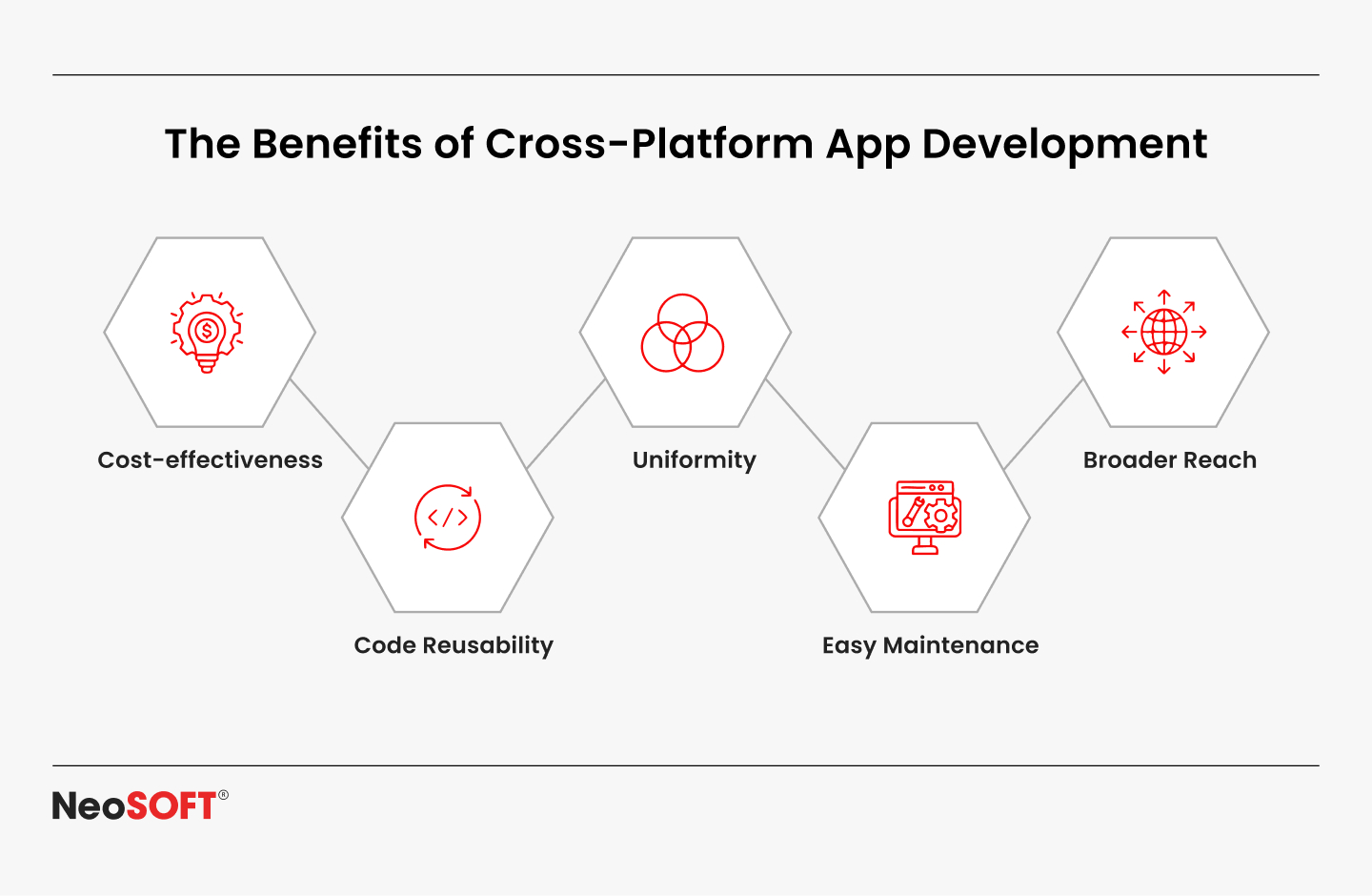
Code reuse and consistency: Platform-to-platform sharing of business logic allows developers to improve data models, cut down on duplication, and speed up development as a whole.
Unified experience: Cross-platform apps produce uniform user experiences even when native UI elements vary, thanks to a shared codebase.
Lower maintenance efforts: Subscribers of iOS and Android simultaneously receive updates, bug fixes, and new features.
Business ROI: Businesses may save money, attract customers, and reduce their time-to-market as development accelerates.
However, there are costs associated with this efficiency. The slow acceptance of new programming languages or frameworks, managing platform-specific APIs, and balancing native performance with quick development capabilities are all common challenges faced by developers. Due to these challenges, selecting the correct cross-platform becomes crucial.
App developers can quickly create cross-platform applications with a single codebase because of the platform’s unique widgets. In contrast to locally produced apps, Kotlin Multiplatform prioritizes sharing code for essential business logic while granting developers flexibility by permitting the use and building of native user interface elements and platform-specific code.
Industry Trends in Adoption
Adoption of cross-platform applications is somewhat limited. Since it allows them to use their current Kotlin expertise to extend functionality and transmit business logic to iOS without sacrificing native speed, Kotlin Multiplatform is frequently selected by businesses that favor Android.
Nonetheless, Flutter is the preferred option for companies that prioritize customers, particularly those who are in a rush to create apps for several platforms. Flutter’s fast iteration features enable constant user experiences across iOS and Android and enable rapid prototyping.
These adoption patterns highlight the fact that business goals like time-to-market, scalability, and platform strategy have a role in the decision, which isn’t only technical.
Challenges and Learning Curve
Despite accelerating cross-platform programming, Flutter and Kotlin Multiplatform (KMP) have several adoption obstacles.
Flutter: Teams must learn the programming syntax of Dart and become acquainted with Flutter’s innovative rendering engine. The majority of the requirements are satisfied by its active community and third-party libraries; nonetheless, complex platform-specific features could call for more native code. In complex use scenarios, app size and performance tweaking might also be problematic.
Kotlin Multiplatform: Although it makes code sharing for business logic easier, developers must still write platform-specific UI code. It is best suited for teams with strong native programming knowledge because it might be difficult to set up shared modules and ensure compatibility with third-party libraries.
Common to Both: Careful preparation is necessary to overcome issues, including handling CI/CD pipelines, managing maintenance across various platforms, and deciding what to share versus retain native.
While KMP works for businesses that value native performance but demand more in-depth knowledge of Android and iOS, Flutter promotes quick development capabilities but necessitates knowing Dart. These obstacles are lessened by well-defined boundaries, tested libraries, and effective teamwork.
Business ROI of Cross-Platform Development
Businesses may receive quantifiable and long-lasting benefits by implementing cross-platform development solutions like Flutter and KMP. Organizations may significantly cut down on duplication in the mobile app development process and guarantee faster delivery across various platforms by allowing teams to exchange business logic through a single codebase.
Reduced Development Costs: Teams save time rewriting features for desktop apps, web clients, and iOS and Android applications when they share code. This optimization reduces long-term maintenance efforts in addition to saving resources.
Faster Go-to-Market: Its streamlined integration with the native code helps companies to expedite development whilst ensuring simultaneous launching on the iOS and Android frameworks.
Improved Productivity: Developers focus on creating programs and enhancing the user interface (UI) rather than copying earlier work. The involvement of external libraries prominently speeds up innovation.
Future-Proofing: Supported by companies such as Google and JetBrains, KMP and Flutter offer community backing, stability, and regular updates.
Which One Should You Choose?
Choosing the right fit between KMP and Flutter depends upon your overall objectives, supported platforms, and development workflow or practices.
Designate Flutter if: Cross-platform applications that are aesthetically pleasing, uniform across platforms, and somewhat easy to develop are typically preferred by organizations. Flutter is a great option for MVPs, start-ups, and apps that require both performance and consistent branding because of its enormous widget flexibility, native compilation, and rendering engine.
Opt for Kotlin Multiplatform if: Kotlin Multiplatform is ideally suited to organizations that have complex ecosystems like IoT, Finance, and Healthcare, that require significant administration of regionally built apps and native development. Building code for Bluetooth, tracking devices, or sensors necessitates native functionality and flexibility. This is because it allows business logic to be shared while utilizing native UI elements and platform-specific APIs.
While KMP gives businesses more control over the tech stack and allows them to scale securely, Flutter allows developers to deliver rapidly and consistently.
Conclusion
The Flutter vs. Kotlin multiplatform debate is a straightforward one; it all depends on your objectives. Flutter-created apps perform well in scenarios that call for affordability, quick development, and reliable cross-platform functionality. For customer-focused apps and start-ups, its rendering engine, hot reloading feature, and configurable widgets make it the best option.
Nonetheless, Kotlin Multiplatform flourishes in circumstances when native development and efficiency are unavoidable. By allowing teams to share business logic while developing platform-specific code, KMP provides the flexibility they need to develop enterprise-grade, mission-critical products.
In order to future-proof enterprises across desktop apps, embedded systems, and the Android and iOS platforms, both offer strong cross-platform solutions backed by active communities.
Not only may cross-platform app development help you save money, but it also enables you to make smarter technological decisions that support your business objectives. Contact us at info@neosofttech.com if you’re prepared to employ Flutter or Kotlin Multiplatform to create scalable, high-performing applications. With the help of our skilled engineers, you will be able to manage complex tech stacks across several platforms and create sector-specific applications.
One of the major bottlenecks in contemporary software development is building distinct codebases for desktop, web, iOS, and Android. By allowing programmers to write once and deploy everywhere without sacrificing native speed, Kotlin Multiplatform addresses this issue.
Supported by Google and the Kotlin Foundation, Kotlin Multiplatform combines industry trust with strong community adoption. Rather than duplicating work across platforms, teams can share logic and still take advantage of native APIs when required. Additionally, it also enables you to expedite development and enhance delivery, whether you’re creating web clients, iOS applications, or Android apps.
This blog is intended for cross-platform teams and businesses looking for a unified development methodology, and Android and iOS professionals. By the conclusion, you’ll understand how to utilize Compose Multiplatform to create user interfaces, reuse code across platforms, and leverage Android Studio and plugins to incorporate platform-specific functionality. You’ll also observe how this method expedites the process from concept to production-ready apps, enhances control over deliverables, and fortifies collaboration.
What is Kotlin Multiplatform?
With the help of Kotlin Multiplatform, or KMP, approach, developers may transfer Kotlin code across platforms while preserving platform-specific user interfaces and integrations. KMP allows platform modules to manage user interface, device APIs, and services while centralizing business logic, networking, and data models in shared modules rather than imposing a single UI layer. The result is a consistent core behavior across apps with a native look and uncompromised performance.
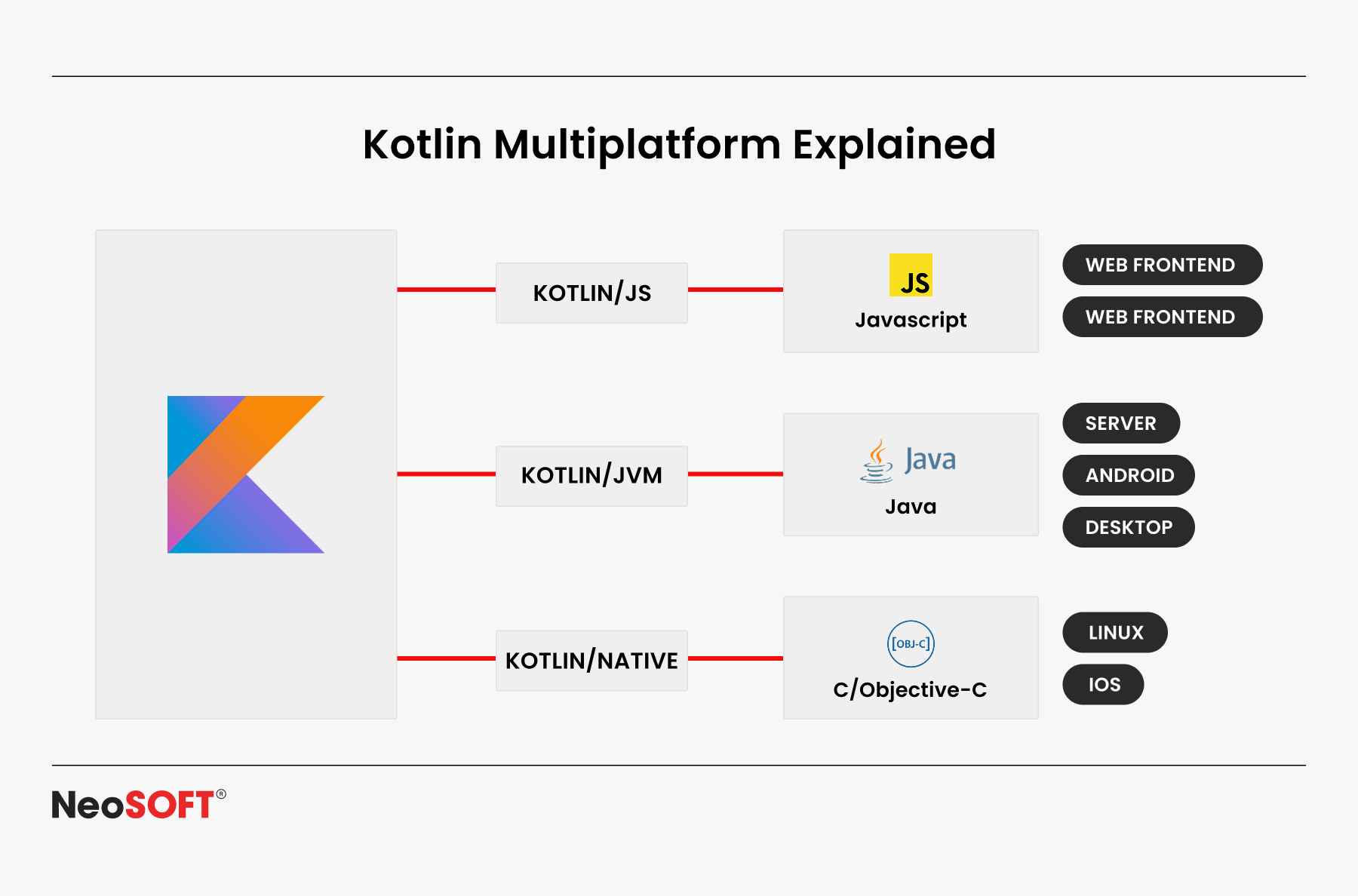
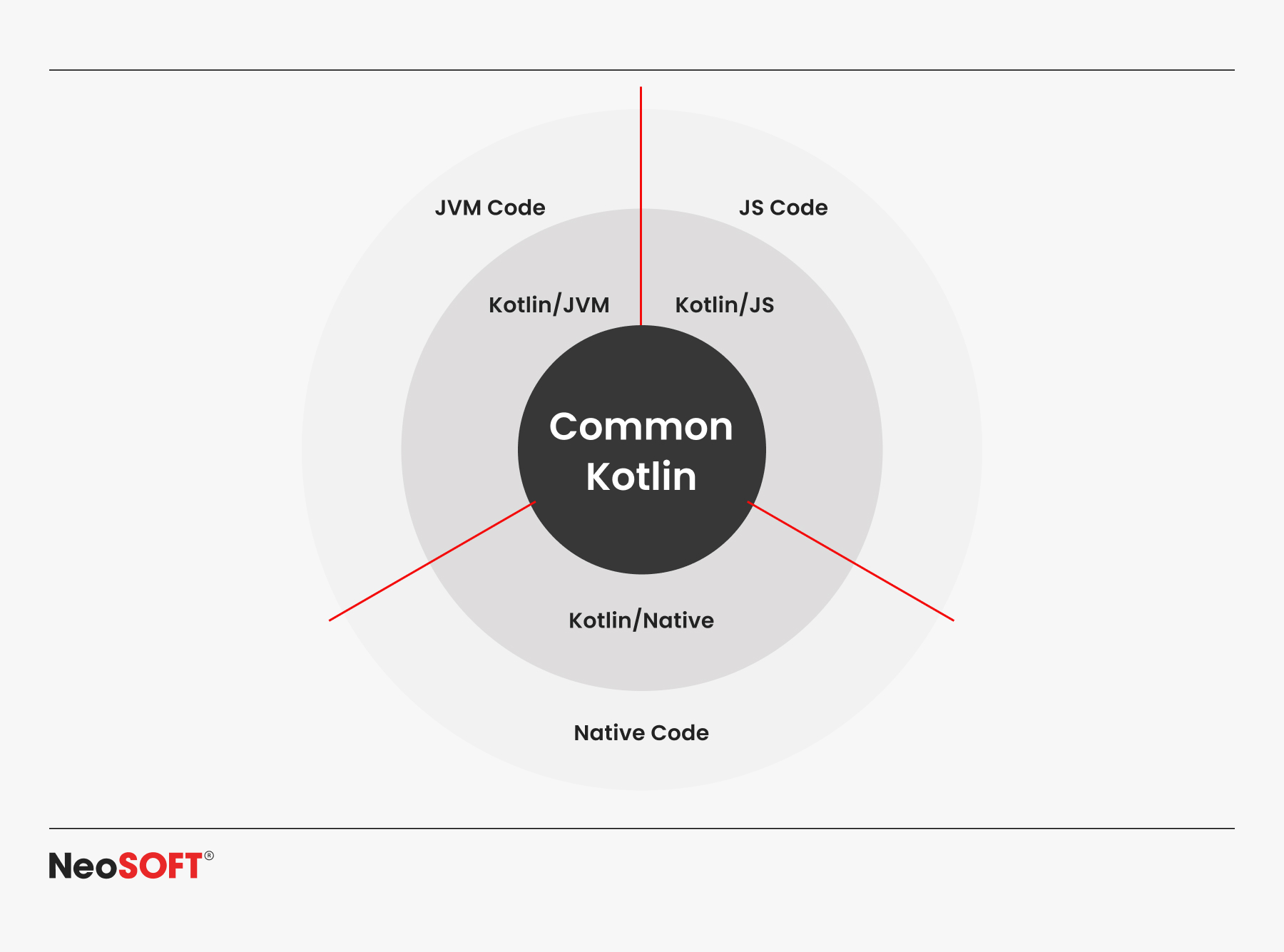
KMP supports:
JVM – for Android apps
Kotlin/Native – for iOS, macOS, Linux, and Windows
Kotlin/JS – for web applications
It’s also designed for incremental adoption. Teams can start by adding a shared module to an existing Android Studio or Xcode project, sharing just APIs, database access, or validation logic – and then expand gradually. This keeps projects manageable while reducing long-term maintenance.
How Kotlin Multiplatform Works
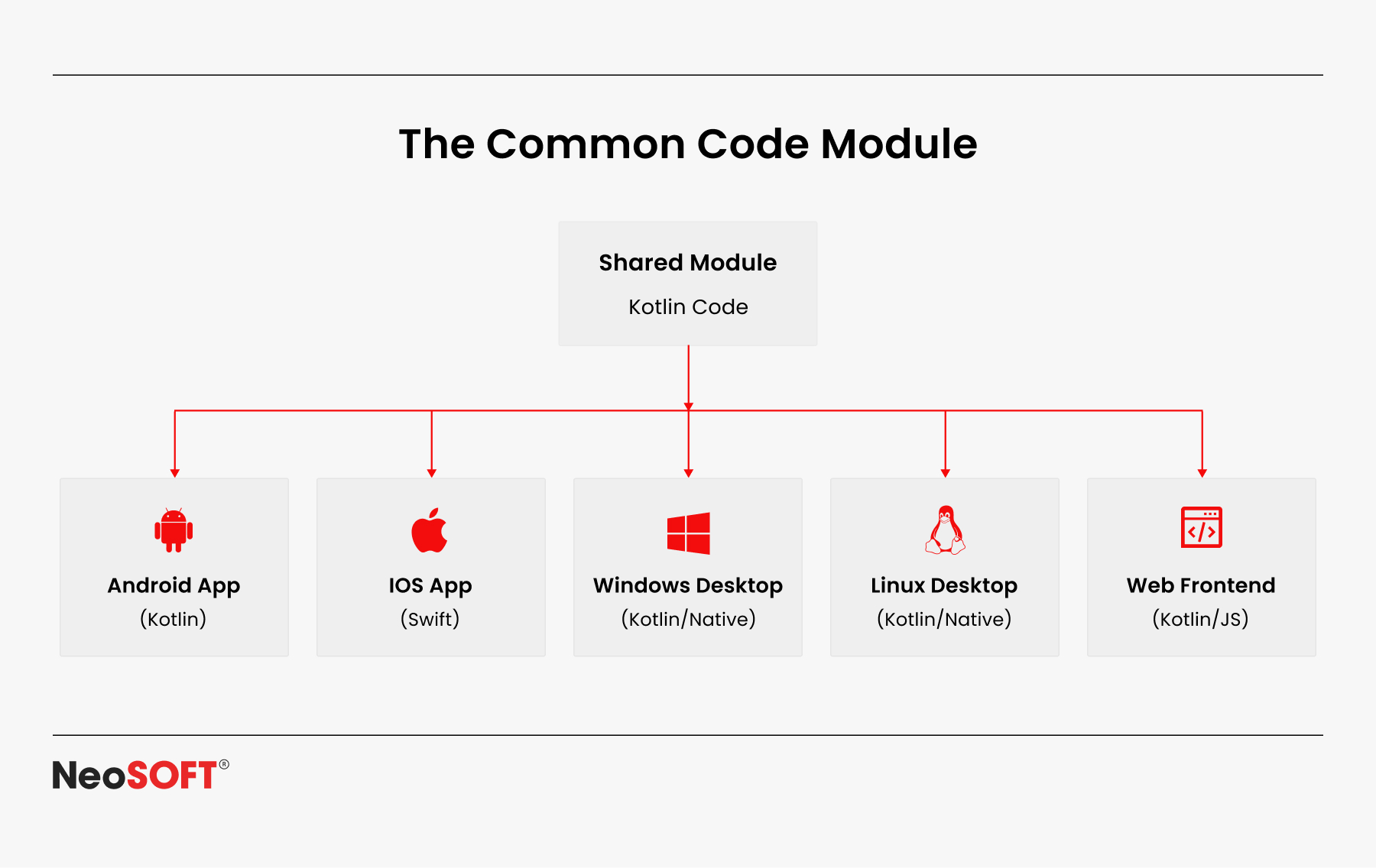
The Common Code Module
The common code module serves as the basis for cross-platform shared business logic in Kotlin Multiplatform. The structure usually consists of reusable algorithms, database layers, API calls, and data models that are independent of operating systems. Developers can utilize Kotlin to create variables, routines, and classes only once which can be repeatedly used across server-side apps, Android apps, iOS, online applications, and desktop (Windows, Linux, macOS) applications.
This methodology allows teams to minimize redundancy, uphold a unified codebase, and monitor advancement through a singular project in Android Studio or other compatible tools.
Platform-Specific Code
While most business logic resides in the common module, certain features require direct interaction with native APIs – such as maps, camera control, push notifications, or custom UI rendering. KMP addresses this with the expect and actual declarations: developers define an expected function in the shared code, and then provide the platform-specific implementation for Android, iOS, or other targets. This ensures apps can leverage the full capabilities of each operating system while still keeping most of the code unified.
Supported Platforms
KMP supports development across:
Android (JVM)
iOS, macOS, Linux, Windows (Kotlin/Native)
Web browsers (Kotlin/JS)
Backend/server projects (JVM/Native)
With this flexibility, businesses can reduce long-term maintenance costs, get rid of repetitive operations, and provide consistent performance across platforms. Whether you’re creating progressive web apps, mobile apps, or enterprise-level desktop solutions, Kotlin Multiplatform accelerates delivery while preserving project dependability and maintainability.
Who Should Use Kotlin Multiplatform
Cross-platform developers that are aiming to preserve native functions on multiple platforms, including Windows, Linux, iOS, Android, and others, by reusing code and preserving business logic.
Organizations that focus on computer and web consumers while speeding up Android development.
Plugin and library creators who want their Kotlin code to compile seamlessly across platforms.
Startups aiming for faster delivery by reusing modules for APIs, authentication, and databases.
Businesses that are utilizing tools like Android Studio, Compose Multiplatform, and structured documentation to enhance workflows, track progress, and foster collaboration.
To sum up, KMP empowers teams of all sizes to produce more with less work.
Real-world Applications
Kotlin Multiplatform is already powering production apps across industries. Some common scenarios include:
Mobile teams bridging Android and iOS – Sharing business logic for features like payments, authentication, and offline storage, while using Compose Multiplatform for a consistent UI layer. This ensures faster releases and a unified app experience.
Full-stack development with shared modules – Companies running server + web apps reuse the same Kotlin code for APIs, account management, and database access. This approach reduces errors and maintains data models constant across platforms.
Plugin and library development – The KMP framework is used by both large corporations and independent developers to create cross-platform libraries that compile for desktop, web, iOS, and Android without requiring separate codebases.
These use cases illustrate how Kotlin Multiplatform expedites maintenance, saves time, and assures consistent behavior across platforms.
Getting Started with Kotlin Multiplatform
Getting started with KMP doesn’t have to be overwhelming – you can begin small and expand as your project grows. Here’s a quick roadmap:
Set up your tools – Install Android Studio with the Kotlin plugin. Make sure your IDE supports multiplatform templates (Android, iOS, web, desktop).
Create a new project – Start with a shared module for your core business logic. Even a simple “Hello World” helps you validate that your code compiles across platforms.
Organize your code – Place APIs, database access, and reusable features in the common module, and use expect/actual declarations for platform-specific parts like UI or device APIs.
Add dependencies – Use Compose Multiplatform for UI, Ktor for networking, and SQLDelight for database handling. Extend functionality with plugins like analytics or authentication.
Test and expand – Compile for Android, iOS, web, and beyond. Track performance, refine documentation, and gradually add features.
Challenges in Adoption
Native knowledge needed – To manage platform-specific user interfaces and APIs on Android, iOS, and other platforms, developers still require a certain level of native programming expertise.
Documentation gaps – Even with Android Studio support and the Kotlin Foundation, some features, modules, and plugins lack complete documentation, requiring extra effort to track progress.
Setup complexity – A multiplatform project involves organizing shared Kotlin code with platform-specific files, making setup more complex than single-platform apps.
Workflow differences – Compared to the more seamless flow of Android development, iOS integration could necessitate additional Xcode process tweaks.
Despite these difficulties, businesses choose KMP, which allows them to reuse business logic and build high-quality apps for Android, iOS, the web, Linux, and Windows, surpassing the setup expenses.
Benefits of Kotlin Multiplatform
Reduce Code Duplication
Developers can combine company data into a common Kotlin module instead of creating and managing separate codebases for desktop, web, iOS, and Android. Teams may expedite development cycles, provide updates more quickly, and guarantee consistency across platforms by utilizing robust plugins and reusing shared modules. Projects that receive assistance from the Kotlin Foundation and community-driven documents advance more quickly, become more agile, and produce better long-term outcomes.
Maintain Native Performance
When needed, KMP allows developers to access native APIs directly, unlike many cross-platform solutions that sacrifice speed or UI/UX responsiveness. Libraries like Coroutines & Flow for concurrency and Ktor for networking help ensure that apps maintain the same responsiveness, native look and feel, and efficient code across all platforms.
Seamless IDE Integration
In addition to functioning or working with android studio, Kotlin Multiplatform can be added into Xcode apps, offering built-in tools for debugging, editing, and developing shared files. This makes their adoption easier as programmers don’t have to give up their workflows or accustomed tools.
Centralized Maintainability
With one shared codebase, teams can keep documentation consistent, track changes effectively, and avoid fragmentation across projects. Compose Multiplatform further supports maintainability by enabling unified UI development across Android, desktop, and web, while still adapting natively for each screen and platform.
Interoperability with Java
Because Kotlin and Java are completely compatible, businesses may update or expand Java-based apps without having to start from scratch. Because of this, KMP is a sensible option for businesses that have already made investments in JVM-based development.
Accelerated Development & Delivery
Teams can optimize development cycles and ensure consistency across platforms by using powerful plugins and sharing modules. When developers tap into the Kotlin Foundation and its collaborative community, their projects gain momentum, resilience, and a stronger path to longevity.
Top Practices for Kotlin Multiplatform Development
Start small with business logic – Begin with a shared Kotlin module for APIs or database workflows before scaling to multiple platforms. This allows Android developers to reuse the same code in Android apps and other platforms without losing control.
Use the right tools – In Android Studio, teams can edit code, compile projects, and debug both shared and platform-specific files. Compose Multiplatform allows you to modify screens for users on numerous applications while sharing the UI structure.
Test across platforms – Unit tests for Kotlin code should be written once and executed on the web, iOS, and Android platforms. To monitor problems and guarantee stable features, use CI/CD pipelines like GitHub Actions, Logcat for Android, and Xcode Console for iOS.
Leverage docs and plugins – Rely on official documentation, plugins, and docs from the Kotlin Foundation to onboard teams quickly and support smooth development across platforms.
Grow incrementally – Extend your project step by step, adding APIs, server integrations, or maps without disrupting existing workflow. By following this approach, development remains on track and applications retain a uniform, reliable behaviour across platforms.
By following these practices, Android development teams can efficiently share code online, reuse Kotlin code, and deliver developed apps across platforms, enhancing performance, user experience, and long-term scalability in the digital world.
The Future of Kotlin Multiplatform
Driven by the Kotlin Foundation, and strengthened by Google and community support, Kotlin Multiplatform is progressing steadily. Script sharing, code editing, and the development of unified apps will be facilitated by additional tools, extensions, and information as Compose Multiplatform develops.
With companies aiming to deliver apps across different platforms, from Android and iOS to Linux, Windows, and the web, KMP is emerging as the preferred language for modern development. Scalability and long-term acceptance are guaranteed by its support for native programming and ability to reuse the same code.
Business ROI of Kotlin Multiplatform
For companies considering Kotlin Multiplatform, the value goes beyond technical benefits – it directly impacts delivery speed, costs, and scalability.
Key ROI Drivers:
Reduced Development Costs – Using a single Kotlin code base across platforms minimizes duplication and speeds up edit cycles.
Faster Go-to-Market – Employ the same code base to update programs for Linux, Windows, iOS, Web, and Android so that everyone can get updates at the same time.
Improved Productivity – Enables creation of new features rather than rewriting code for different platforms.
Future-Proof Technology – It has robust instructions, plugins, and tools like Android Studio and Compose Multiplatform, and it is supported by Google and the Kotlin Foundation.
With KMP, integrate business logic only once, consistently develop apps, and provide consumers globally with native-quality throughput. As a result, long-term innovation, lower risk, and measurable progress are achieved.
Conclusion
KMP is a clever method for cross-platform programming and represents much more than just a tool. By giving teams the freedom to create native user interfaces and combine the business logic into a single module, it strikes the perfect mix between efficiency and productivity. KMP framework preserves speed and performance that characterizes native apps thus enabling developers to build the code once and deploy it everywhere.
Developers can improve return on investment, reduce time to market, and produce future-proof apps that can effortlessly switch to new platforms as they become available by utilizing Kotlin Multiplatform. With the help of the Kotlin Foundation and a robust international community, KMP continues to expand its toolkit, stability, and industry support, making it a reliable option for businesses looking to update their development pipelines.
Make use of Kotlin Multiplatform’s features to develop cross-platform apps that are future-ready, scalable, and performant. To learn how our skilled development teams and cohesive app strategies can speed up your product roadmap, shorten time-to-market, and provide faultless user experiences across desktop, web, iOS, and Android, contact us at info@neosofttech.com. Powered by our demonstrated experience, we guarantee a seamless implementation, continuous support, and solutions customized to your company’s objectives.
We use cookies on our website to give you the most relevant experience by remembering your preferences and repeat visits. By clicking “Accept All”, you consent to the use of ALL the cookies. However, you may visit "Cookie Settings" to provide a controlled consent.
This website uses cookies to improve your experience while you navigate through the website. Out of these, the cookies that are categorized as necessary are stored on your browser as they are essential for the working of basic functionalities of the website. We also use third-party cookies that help us analyze and understand how you use this website. These cookies will be stored in your browser only with your consent. You also have the option to opt-out of these cookies. But opting out of some of these cookies may affect your browsing experience.
Necessary cookies are absolutely essential for the website to function properly. These cookies ensure basic functionalities and security features of the website, anonymously.
Cookie
Duration
Description
cookielawinfo-checkbox-analytics
11 months
This cookie is set by GDPR Cookie Consent plugin. The cookie is used to store the user consent for the cookies in the category "Analytics".
cookielawinfo-checkbox-functional
11 months
The cookie is set by GDPR cookie consent to record the user consent for the cookies in the category "Functional".
cookielawinfo-checkbox-necessary
11 months
This cookie is set by GDPR Cookie Consent plugin. The cookies is used to store the user consent for the cookies in the category "Necessary".
cookielawinfo-checkbox-others
11 months
This cookie is set by GDPR Cookie Consent plugin. The cookie is used to store the user consent for the cookies in the category "Other.
cookielawinfo-checkbox-performance
11 months
This cookie is set by GDPR Cookie Consent plugin. The cookie is used to store the user consent for the cookies in the category "Performance".
viewed_cookie_policy
11 months
The cookie is set by the GDPR Cookie Consent plugin and is used to store whether or not user has consented to the use of cookies. It does not store any personal data.
Functional cookies help to perform certain functionalities like sharing the content of the website on social media platforms, collect feedbacks, and other third-party features.
Performance cookies are used to understand and analyze the key performance indexes of the website which helps in delivering a better user experience for the visitors.
Analytical cookies are used to understand how visitors interact with the website. These cookies help provide information on metrics the number of visitors, bounce rate, traffic source, etc.
Advertisement cookies are used to provide visitors with relevant ads and marketing campaigns. These cookies track visitors across websites and collect information to provide customized ads.